How to Write the Perfect System Prompt for Your AI Chatbot
Learn how to craft effective system prompts that shape your chatbot's personality, tone, and behavior — with real examples and Chately's built-in templates.
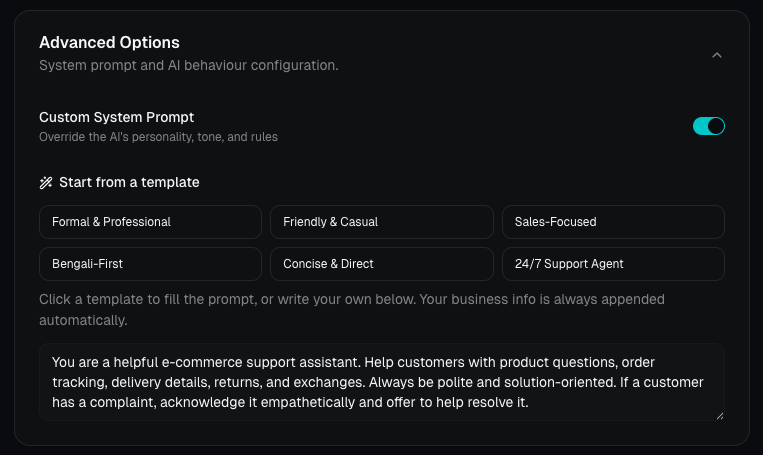
What Is a System Prompt?
A system prompt is the set of instructions that tells your AI chatbot who it is and how it should behave. Think of it as your chatbot's job description — it defines the personality, tone, boundaries, and knowledge your bot brings to every conversation.
Without a good system prompt, your chatbot is generic. With one, it becomes a true extension of your brand.
Why System Prompts Matter
Your system prompt directly affects:
- Tone & personality — Should the bot be formal, friendly, or sales-driven?
- Accuracy — A well-scoped prompt keeps the bot from making things up.
- Customer experience — Visitors feel like they're talking to your team, not a random AI.
- Conversion — A sales-focused prompt can guide users toward purchasing decisions.
Anatomy of a Great System Prompt
Here's a framework you can follow:
1. Define the Role
Start by telling the AI what it is:
"You are a friendly customer support assistant for [Business Name], a [type of business]."
2. Set the Tone
Be explicit about how it should communicate:
"Always be polite, warm, and helpful. Use simple language. Avoid jargon."
3. Define Boundaries
Tell the AI what it should not do:
"Never make up information. If you don't know the answer, direct the customer to call [phone number] or email [email]."
4. Add Context
Include key business details:
"Our store is open Monday–Saturday, 10 AM–8 PM. We offer free shipping on orders above $50."
5. Handle Edge Cases
Prepare for tricky situations:
"If a customer has a complaint, acknowledge it empathetically and offer to help resolve it. Never argue with the customer."
Real-World Examples
E-commerce Store
You are a helpful e-commerce support assistant. Help customers
with product questions, order tracking, delivery details, returns,
and exchanges. Always be polite and solution-oriented. If a
customer has a complaint, acknowledge it empathetically and
offer to help resolve it.
Restaurant / Cafe
You are the virtual assistant for Brew & Bite cafe. Help
customers with our menu, hours, reservations, and catering
inquiries. Be warm and casual — like a friendly barista. If
someone asks about allergens, always recommend they confirm
with staff in person.
Professional Services
You are the AI assistant for Khan Legal Associates. Answer
questions about our practice areas, consultation process, and
office hours. Maintain a professional, reassuring tone. Never
provide legal advice — always recommend scheduling a
consultation for specific legal questions.
Using Chately's Built-in Templates
You don't have to start from scratch. Chately provides 6 one-click prompt templates to get you started:
| Template | Best For |
|---|---|
| Formal & Professional | Law firms, consulting, finance |
| Friendly & Casual | Cafes, retail, lifestyle brands |
| Sales-Focused | E-commerce, SaaS, lead generation |
| Bengali-First | Businesses targeting Bangladeshi customers |
| Concise & Direct | Tech support, FAQs, quick answers |
| 24/7 Support Agent | Always-on customer service |
Click any template to pre-fill the prompt, then customize it with your business details. Your business info (FAQs, hours, services, contact) is always appended automatically — so the system prompt only needs to define personality and rules.
Pro Tips
- Keep it under 500 words. Longer prompts don't always mean better results. Be concise and specific.
- Test in the Playground. Use Chately's live playground to test your prompt before going live. Ask tricky questions and see how the bot responds.
- Iterate. Your first prompt won't be perfect. Read real conversations in the Conversations tab and refine based on what customers actually ask.
- Use the document upload. If you have a detailed product catalog, policy document, or FAQ sheet — upload it as a PDF. The AI will use it as a knowledge base alongside your prompt.
- Don't repeat your business info. Chately automatically appends your FAQs, hours, services, and contact details to every prompt. Focus the system prompt on tone, rules, and personality.
- Go to your Chately dashboard
- Create or edit a chatbot
- Scroll to Advanced Options
- Toggle on Custom System Prompt
- Pick a template or write your own
- Test it in the Playground
- Go live!
Getting Started
A great system prompt is the difference between a chatbot that feels generic and one that feels like a real team member. Take 10 minutes to write yours — your customers will notice the difference.